
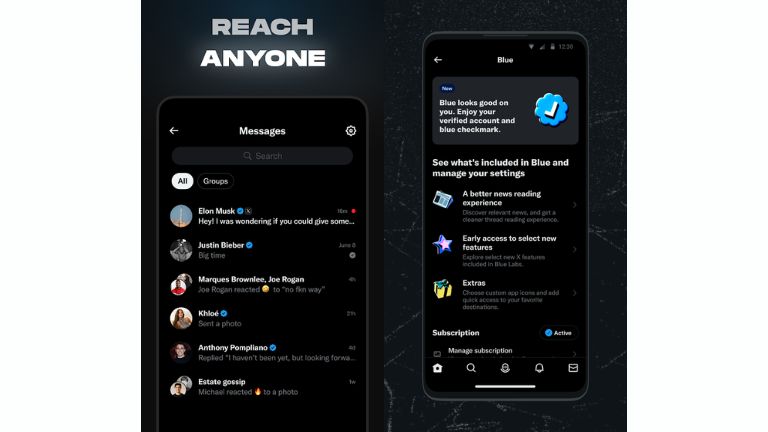
The X Twitter app isn’t just about posting quick updates anymore. It’s a digital town square where breaking news unfolds, communities thrive, and even AI tools like Grok help you make sense of it all. With over a billion downloads on Android alone, it’s clear why millions turn to it daily for everything from sports highlights to political debates. Let’s break it down step by step.
What Is the X Twitter App
At its core, the X Twitter app is a social platform for sharing short posts, now called “posts” instead of “tweets.” Users can follow others to see their content in a personalized feed, engage through likes, reposts, and replies, and discover trending topics worldwide. Owned by Elon Musk, it’s designed for instant interactions, making it perfect for live events like sports games or elections.
What sets the X Twitter app apart is its integration of multimedia. You can upload videos up to three hours long, host live audio chats via Spaces, or even stream gameplay. Plus, with Grok—an AI powered by xAI—you get summaries of news or context on posts right in the app. It’s free to download and use, though premium subscriptions unlock extras like editing posts and fewer ads.
For beginners, the app’s interface is intuitive: a home timeline for followed accounts, an explore tab for trends, and notifications for interactions. It’s available on mobile and web, blending social networking with real-time info.
Why Twitter Was Renamed to X
The shift from Twitter to X happened in 2023 under Elon Musk’s vision. The old name evoked short, bird-like “tweets,” but Musk wanted an “everything app” like China’s WeChat—handling social, payments, and more. By 2026, X has expanded beyond 280-character limits to include long-form articles, AI-sorted feeds, and even crypto trading teases.
This rebrand reflects Musk’s goal for a multifaceted platform. Followers became “viewers,” tweets turned to posts, and the blue bird logo gave way to a sleek X. It’s not just a name change; it’s about evolving into a hub for news, entertainment, and finance. For users, it means more features but a departure from Twitter’s chaotic charm.
Key Features of the X App
The X app packs a punch with tools for engagement and discovery. Real-time updates keep you in the loop on global events, while the AI-sorted “Following” feed prioritizes relevant posts based on your interactions. Grok AI stands out, offering summaries, image generation, and context—perfect for fact-checking viral content.
Video is huge: Watch clips, stream live, or join Spaces for audio discussions. Communities let you connect over niches like gaming or crypto. Premium users get perks like longer posts (up to 25,000 characters), blue checkmarks, and revenue sharing from ads.
Recent 2026 updates include a Priority notifications tab for key interactions, Smart Cashtags for real-time asset prices, and an open-sourced algorithm for transparency. These make X more interactive, like reacting to posts with videos or exploring global trends.
In real-world use, journalists break stories here, brands engage customers, and fans discuss live sports. Future updates hint at payments and in-app trading, turning X into a super app.
How to Download X Twitter App on Android and iOS
Getting started is simple. For iOS, head to the App Store, search for “X,” and tap download—it’s free and works on iPhone, iPad, or iPod Touch with iOS 15.0+. Android users, open Google Play Store, search “X,” and install. It requires Android 6.0+ and has over a billion downloads.
Once installed, open the app and sign up with an email or phone. Verify your account, and you’re ready to explore. Updates are frequent, so enable auto-updates for the latest features like the new Trending tab powered by Grok.
If you’re into alternatives, check out our guides on TikTok for short videos or Snapchat for ephemeral chats.
X Twitter APK Download Guide
For Android users wanting the X Twitter APK, it’s useful if the Play Store isn’t available in your region. Download from trusted sites like Softonic or APKMirror, but avoid shady sources to prevent malware. Enable “Unknown Sources” in settings, install the APK, and update manually.
Be cautious: Official downloads are safest via Play Store. APK sideloading can expose risks, so scan files with antivirus. It’s free, but always verify the version matches the latest, like 11.60 from January 2026.
How to Login to X App and X com Web
Logging in is straightforward. In the app, enter your username or email and password. For web at x.com, do the same—it’s seamless across devices. Forgot your password? Use the reset link.
Two-factor authentication adds security, though text-based 2FA is now Premium-only. New users can sign up directly. Pro tip: Use a strong, unique password.
Is the X App Safe and Free to Use
Yes, the X app is free for basic use, with optional Premium tiers starting at $4 monthly. Safety-wise, it encrypts data in transit and offers features like blocking and reporting. However, be mindful of privacy—X collects location and personal info for ads.
To stay safe, avoid sharing sensitive details, enable private accounts, and use VPNs if needed. Recent transparency reports show efforts against illegal content, but user vigilance is key. For kids under 16 in some regions, access is restricted.
X App vs Old Twitter Experience
Compared to old Twitter, X is more polished with AI feeds, video tabs, and long-form articles—ditching chronological purity for relevance. The rebrand added commercial vibes, like payments on the horizon, but lost some scrappy feel.
Pros: Richer features, global focus. Cons: Algorithm changes can bury posts. It’s evolved for creators, but purists miss the simplicity.
If you prefer voice chats, try our Discord App overview, or encrypted messaging with Telegram.
Pros and Cons of the X Twitter App
Pros: Real-time news, Grok AI, community building, free core features, multimedia support.
Cons: Data privacy concerns, ad-heavy for non-Premium, algorithm biases, potential for misinformation.
Overall, benefits outweigh drawbacks for engaged users.
Final Verdict on X Twitter App
In conclusion, the X Twitter app is your go-to for staying connected in 2026. With its blend of social features, AI smarts, and future-proof updates like payments, it’s more than an app—it’s an ecosystem. Download the latest version today and dive in; you won’t need another search for x twitter insights.
FAQ
Is the X app Twitter?
Yes, the X app is the rebranded version of Twitter, offering the same core functions with expanded features like AI and long videos.
Why is Twitter called X?
Elon Musk renamed it to X to transform it into an “everything app” beyond short posts, incorporating payments, video, and more under musk x vision.
What is the X app used for?
The X app is for real-time conversations, sharing posts, watching videos, joining communities, and accessing news—ideal for x tweet interactions and elon musk x app updates.
Is Twitter X still free?
Absolutely, the basic Twitter account X login and features remain free, with optional Premium for extras like editing and fewer ads.