VLC for Android App remains one of the most trusted media players in 2026. Android users continue to rely on it for playing virtually any video or audio file without hassle. Its open-source nature, zero ads, and broad format support keep it popular among people who want a reliable offline player.
Whether you’re streaming local files, handling network shares, or enjoying music on the go, this app delivers consistent performance. In a year full of flashy video apps, VLC for Android App stands out for staying simple, powerful, and completely free.
What is VLC for Android App
VLC started as a desktop media player in the early 2000s under the VideoLAN project. It quickly gained fame for playing almost every format without needing extra codecs. The Android version arrived later and has matured into a full port of the classic VLC experience.
On Android devices, VLC uses the same core engine (LibVLC) as the desktop version. This means it handles local files, network streams, and even disc images with ease. The mobile version adapts the interface for touch controls, gestures, and smaller screens.
The main difference from desktop VLC lies in the UI. Mobile focuses on swipe gestures for brightness, volume, and seeking. It also includes a built-in media library that scans your device automatically. Desktop versions often feel more complex with advanced menus, while the Android edition keeps things straightforward for quick playback.
Key Features of VLC for Android App
VLC for Android App shines because of its massive format support. It plays MKV, MP4, AVI, MOV, TS, M2TS, WMV, FLAC, AAC, Ogg, and many more—without downloading additional packs.
- Video playback includes hardware acceleration for smooth 4K and even higher resolutions on capable phones.
- As a VLC Android music player, it offers a full equalizer, playlist management, and album art display.
- Subtitle support covers embedded tracks, external .srt files, and automatic downloads from online sources.
- Network streaming works great for HLS, DASH, SMB shares, FTP, and UPnP/DLNA servers.
- VLC Android Auto integration lets you control music and podcasts safely while driving (video playback is limited for safety reasons).
- Offline playback handles everything locally—no internet required after files are on your device.
- Privacy stands out: no ads, no user tracking, and fully open-source code.
These features make it ideal for users tired of apps that push subscriptions or collect data.
VLC for Android App Performance and User Experience
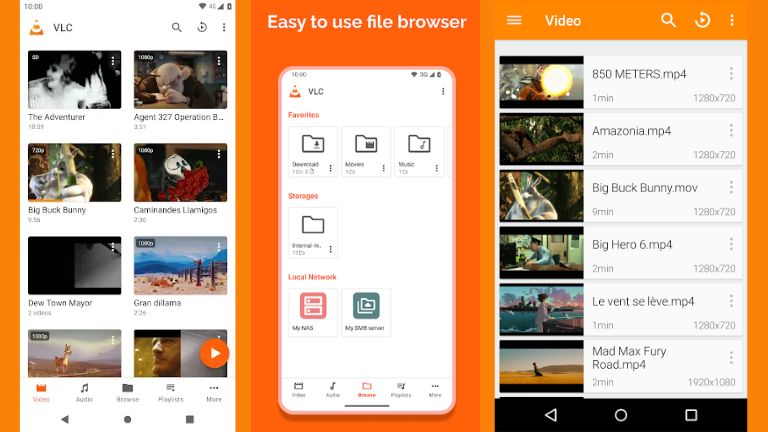
The UI in 2026 feels clean but functional rather than flashy. Gesture controls work intuitively—swipe left/right to seek, up/down for volume or brightness. The app organizes content into video, audio, playlists, and streams tabs.
Speed remains excellent. It launches quickly and decodes heavy files without stuttering on mid-range phones. Stability has improved with recent updates fixing AV1 playback and subtitle issues.
Battery usage stays reasonable during local playback. Hardware decoding helps here. On low-end Android phones, it still outperforms many competitors because it avoids unnecessary animations. High-end devices handle 8K or HDR content smoothly.
Overall, the experience prioritizes reliability over eye candy, which many long-time users appreciate.
VLC APK Download and Installation Guide
Most people grab VLC for Android App directly from the Google Play Store—it’s the safest and easiest method. Search for “VLC” by VideoLAN to find the official version.
Some users prefer the VLC media player APK (often called VLC APK latest version) from third-party sites for faster updates or regional reasons. The Play Store version and sideloaded APK come from the same source code, but beta builds sometimes appear first outside the store.
Always verify the developer as VideoLAN. Check file hashes if possible, and enable “Unknown Sources” only temporarily in Android settings. Scan APKs with antivirus tools before installing. Stick to trusted mirrors like the official VideoLAN site when sideloading.
For the VLC app download, Play Store remains the recommended choice in 2026 to avoid risks.
If you’re comparing other players, check out our detailed look at the MX Player App for a different approach.
VLC for Android App Pros and Cons
Pros
- Plays virtually every video and audio format without extra codecs
- Completely free with no ads or in-app purchases
- Strong privacy—no tracking or data collection
- Excellent subtitle and multi-audio track support
- Works offline and supports network streaming
- VLC Android Auto compatibility for safe driving
- Regular updates from an active open-source community
Cons
- Interface looks dated compared to modern apps
- Fewer fancy editing or streaming service integrations
- Gesture controls take time to master for new users
- Occasional delays in adopting brand-new codecs
VLC for Android vs Other Media Player Apps
VLC for Android App competes directly with MX Player in the Android ecosystem.
MX Player offers smoother gesture controls and better subtitle downloading in some cases. However, the free version includes ads, and privacy-conscious users often dislike the data practices.
VLC wins on format support and zero-compromise privacy. It doesn’t push premium versions or show banners during playback. If you value an ad-free experience and broad compatibility over polished UI tweaks, VLC feels more trustworthy.
For streaming-focused needs, services like the Netflix App or Prime Video App handle their own content better, but they can’t match VLC’s local file versatility. Music lovers might pair it with the Spotify App for different use cases.
FAQ
Does VLC work on Android?
Yes, VLC for Android App runs on most Android devices from version 4.2 onward. It performs well on phones, tablets, Android TV, and even Chromebooks.
Is VLC totally free?
Absolutely. The app is free to download and use forever. No hidden fees, no premium unlocks, and no ads.
Is VLC for Android safe to download?
Yes, especially from Google Play or the official VideoLAN website. Avoid random third-party sites to minimize risks from modified APKs.
Why is VLC Android not working?
Common issues include outdated app versions, permission problems, or codec incompatibilities. Update to the VLC APK latest version, clear cache, or restart your device. File corruption can also cause playback failures.
Can VLC play all video formats on Android?
It supports almost every format, including rare ones like MKV with subtitles, AV1, and high-bitrate 4K files. Very few exceptions exist, usually bleeding-edge codecs still in development.
Does VLC support subtitles on Android?
Yes, it handles embedded subtitles, side-loaded .srt files, and even auto-downloads them from online databases. You can adjust timing, font, and size easily.
In 2026, VLC for Android App continues proving why it’s a favorite. Its no-nonsense approach to media playback makes it essential for anyone building a personal media library on their phone. Give it a try if you want a player that just works—every time.