
Introduction
If you’re into messaging apps that prioritise speed and innovation, you’ve probably heard of Telegram X. It’s not just another chat tool—it’s an experimental take on the popular Telegram platform, designed for users who crave smoother performance and cutting-edge features. People often search for Telegram X when they’re frustrated with slower apps or want to try something fresh in the messaging world.
What draws folks in? Its lightning-fast speeds, sleek design, and strong focus on privacy make it stand out. Whether you’re chatting with friends, sharing files, or managing groups, Telegram X promises a more fluid experience without sacrificing the security Telegram is known for. Let’s dive deeper into what makes it tick.
What Is Telegram X?
Telegram X is essentially an alternative client for the Telegram messaging service. Think of it as a souped-up version built from the ground up to test new ideas and improve on the original app’s performance. Launched by the Telegram team back in 2018, it’s aimed at users who want a faster, more experimental messaging experience.
Unlike third-party apps, Telegram X is official—developed by the same folks behind Telegram. It’s available primarily for Android, and while it shares the core functionality of sending messages, voice calls, and file sharing, it feels distinctly different in day-to-day use.
Difference between Telegram and Telegram X
The main Telegram app is the stable, feature-packed workhorse most people use. It gets regular updates with polished additions like stories, premium subscriptions, and broad device support. Telegram X, on the other hand, is more like a concept car—built for speed and experimentation.
Key differences include:
- Performance: Telegram X is noticeably quicker, with smoother scrolling and transitions. If the standard app feels a bit laggy on older devices, X might be your fix.
- Features: X often tests experimental tools before they hit the main app, but it skips some, like Telegram Premium perks.
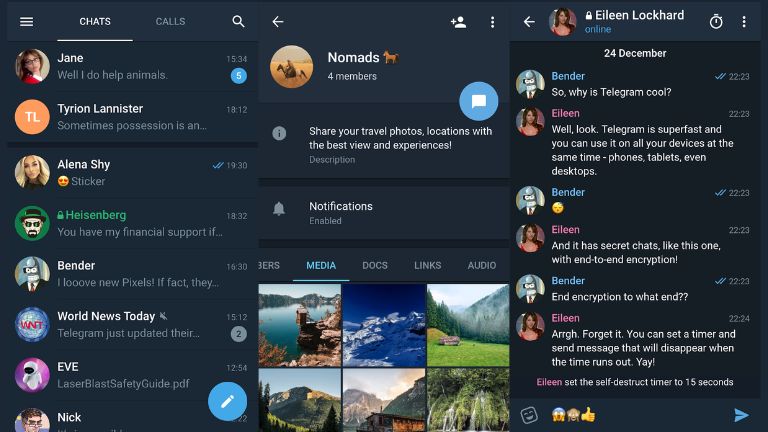
- Interface: X has a minimalist vibe with options like bubble-free chats and enhanced night mode, while the original sticks to a classic layout.
- Updates: The standard Telegram gets more frequent tweaks, but X still sees active development for its niche audience.
In short, if you value stability over speed, stick with Telegram. But for a snappier feel, X is worth exploring.
How Telegram X Works
At its core, Telegram X operates just like Telegram—your account syncs across devices, and you can access chats, groups, and channels seamlessly. But under the hood, it’s powered by different tech that sets it apart.
Technology behind it (TDLib)
Telegram X is built on TDLib (Telegram Database Library), a specialised framework designed for creating high-performance Telegram clients. This library separates the user interface from the networking code, allowing for optimisations that make everything run smoother. For example, TDLib handles data syncing and encryption efficiently, reducing battery drain and improving responsiveness.
Compare this to the original Telegram, which uses its own architecture. TDLib’s approach means X can experiment with features without bogging down the main app. It’s like having a lab version where developers tweak things for better efficiency.
Performance optimization
Telegram X shines in optimisation. It consumes fewer resources, making it ideal for mid-range phones. Animations are buttery smooth—swiping through chats or opening media feels instantaneous. In tests, actions like loading large group histories or previewing images happen faster than in the standard app.
For instance, if you’re in a busy channel with thousands of posts, X’s caching and rendering tech loads content quicker, avoiding the occasional stutter you might see elsewhere. This makes it a go-to for power users who handle heavy messaging loads.
Higher Speeds and Faster Actions
Speed is Telegram X’s calling card. The app responds to taps and swipes almost instantly, thanks to its lightweight build.
App responsiveness
Opening the app, switching tabs, or searching for contacts—all feel snappier. On a device like a Google Pixel or Samsung Galaxy, you might notice load times shaved by seconds, which adds up over time. It’s especially helpful in low-signal areas where the original app might hesitate.
Animation smoothness
Animations in Telegram X are a step above—fading menus, sliding drawers, and zooming previews look polished and fluid. No janky transitions here; it’s like the app anticipates your moves. This isn’t just cosmetic—it makes navigation intuitive, reducing frustration during long sessions.
Experimental Functions and New Features
Telegram X is where innovation happens first. It’s a testing ground for ideas that might eventually migrate to the main app.
Unique features
Standouts include swipe gestures for quick actions like deleting messages or going back, and chat previews without opening threads fully. You also get tabs for separating chats and calls, which keeps things organised.
For example, long-pressing a message lets you react or forward faster than in the standard version.
UI & customization
The interface is cleaner, with options to toggle bubble chats for a minimalist look. Night mode is deeper, with auto-switching based on time or ambient light. Customise themes, fonts, and layouts more granularly—perfect for tweaking to your style.
Imagine redesigning your chat screen to hide bubbles, making it feel like a streamlined email inbox.
Tools for Groups and Channels
Telegram X enhances group and channel management with its speedy backbone.
Admin tools
Admins get quicker access to moderation features like banning users or pinning messages. Bulk actions load faster, handy for large communities.
Channel management
Creating and editing channels is seamless. Post scheduling, analytics previews, and subscriber management feel more responsive. If you run a news channel, uploading media batches happens without hitches.
For instance, in a 10,000-member group, searching for members or applying filters is noticeably quicker.
Manage Multimedia and Other Files
File handling is a breeze in Telegram X.
File sharing
Share large files up to 2GB effortlessly, with faster uploads and downloads thanks to optimised compression. No more waiting for progress bars to crawl.
Media handling
Preview images and videos inline without lag. Features like an incognito keyboard for privacy during typing add layers of control. Editing photos before sending is smoother, too.
Picture this: Sending a vacation album to family—X compresses and transmits it in half the time.
Privacy and Security in Telegram X
Privacy is baked into Telegram X, mirroring the main app’s standards.
Encryption
It uses the same MTProto protocol for server-client encryption, with end-to-end for secret chats. Your messages are secure from prying eyes.
User data protection
No ads mean your data isn’t sold. Features like two-step verification and passcode locks add extra shields. You control who sees your phone number or online status.
Safety comparison
Compared to the main Telegram, X is equally safe but might get security patches slightly slower. Both beat out apps like WhatsApp in flexibility, but always enable secret chats for sensitive talks.
Telegram X Download Guide
Getting Telegram X is straightforward, but stick to safe sources to avoid fakes.
Telegram X download for Android
Head to the Google Play Store and search for “Telegram X” by Telegram LLC. It’s free and auto-updates.
telegramx apk download (safe sources only)
For APK, download from trusted sites like Uptodown or the official GitHub repo (TGX-Android). Avoid random websites—scan with an antivirus first.
Installation tips
Enable unknown sources in settings if sideloading. After installation, log in with your Telegram number. It syncs everything automatically. Test on a secondary device first if unsure.
Pros and Cons of Telegram X
Advantages
- Blazing speeds and smooth animations for a premium feel.
- Experimental features give you a sneak peek at future Telegram updates.
- Lower battery usage, great for on-the-go users.
Limitations
- Misses some main app features like Premium subscriptions.
- Updates aren’t as frequent, so bugs might linger longer.
- Primarily Android-focused; iOS users get similar perks in the standard app.
Is Telegram X Still Updated?
Yes, Telegram X is still actively maintained. The latest Android version dropped in late 2025, with ongoing GitHub activity showing commits into November. It’s not as rapid as the main app’s updates, but the team keeps it alive for its dedicated fans.
Looking ahead, expect more integrations from TDLib experiments. It might evolve or merge features back into Telegram, but for now, it’s a solid option.
FAQ Section
What is Telegram X used for?
Telegram X is used for messaging, just like Telegram, but with a focus on speed and testing new features. It’s great for chats, groups, file sharing, and calls where performance matters.
Is Telegram X still safe to use?
Absolutely—it’s an official app with the same encryption as Telegram. Use two-factor authentication and avoid shady downloads for the best safety.
How do I link X to Telegram?
No need to “link”—just log in with your existing Telegram account. Everything syncs automatically across both apps.
Who is the founder of Telegram X?
Pavel Durov, the founder of Telegram, oversees Telegram X as part of the company’s experimental projects.
Is Telegram X better than Telegram?
It depends. X is better for speed and smoothness, but the main Telegram wins on features and frequent updates. Try both to see what fits.
Conclusion
Telegram X offers a fresh spin on messaging, blending speed, innovation, and privacy into one package. It’s not for everyone, but if you’re tired of sluggish apps or love tinkering with experimental tools, it’s a winner.
Who should use it? Tech enthusiasts, heavy messengers on Android, or anyone seeking a lighter alternative. Give it a shot—you might find it becomes your daily driver. Stay safe online, and happy chatting!