
Introduction
If you’ve ever wondered about a messaging app that’s fast, versatile, and packed with features beyond just chatting, chances are you’ve heard of Telegram. Telegram is a popular messaging platform that lets you send texts, share files, join groups, and even broadcast messages to large audiences. It’s like a supercharged version of your typical chat app, but with a focus on speed and privacy.
What makes Telegram stand out worldwide? For starters, it’s got over a billion users, making it one of the top messaging apps right next to giants like WhatsApp. People love it because it’s free, works seamlessly across devices, and emphasizes user privacy with options like end-to-end encryption for sensitive talks. Plus, its cloud-based system means your chats are always synced, no matter if you’re on your phone, tablet, or computer. Whether you’re chatting with friends, following news channels, or even running a business, Telegram’s blend of speed, security, and extras has made it a go-to for millions. In this complete guide, we’ll dive into everything from how it works to its safety features, so you can decide if it’s right for you.
What is Telegram?
Telegram is essentially a free messaging app that allows you to communicate with others over the internet. Think of it as a mix between a chat app and a social network. You can send messages, photos, videos, and files to individuals or groups, and it all happens in real-time. Unlike some apps that feel clunky, Telegram is designed to be lightweight and quick, even on slower connections.
The app was created by Pavel Durov and his brother Nikolai in 2013. Pavel, who also founded the Russian social network VK, wanted to build something that prioritized privacy after facing government pressure in Russia. Today, it’s run by Telegram FZ-LLC, based in Dubai, and it’s grown into a global phenomenon with users in every corner of the world.
So, what’s the big difference between Telegram and other messaging apps like WhatsApp or Signal? For one, Telegram is cloud-based, which means your messages are stored on their servers, allowing easy access from any device without needing backups. WhatsApp, on the other hand, focuses more on end-to-end encryption by default for all chats, while Telegram reserves that for “secret chats.” Telegram also shines in group features—groups can have up to 200,000 members, way bigger than most competitors. It’s great for communities, businesses, or anyone who wants more than just one-on-one talks. If you’re tired of apps that limit file sizes or charge for extras, Telegram feels like a breath of fresh air with its unlimited storage and bot integrations.
How Does Telegram Work?
At its core, Telegram operates on a cloud-based system, which is what sets it apart from many other apps. When you send a message, it’s uploaded to Telegram’s servers and then delivered to the recipient. This means everything is stored online, not just on your device, so you don’t lose chats if you switch phones.
The sync across devices is seamless. Log in on your phone, and your conversations appear instantly on your laptop or tablet. No need to manually transfer data—it’s all handled in the cloud. This is perfect for people who juggle multiple gadgets, like checking messages at work on a desktop and then picking up on mobile during a commute.
Everything runs over the internet, so you need a data connection or Wi-Fi. Unlike SMS, there’s no fallback to traditional texting, but that keeps costs down since it’s free worldwide. Telegram uses its own MTProto protocol for encryption, which protects your data in transit. For example, if you’re in a group chat discussing weekend plans, everyone sees updates in real-time, and if someone joins later, they can scroll back through the history effortlessly. It’s straightforward, but the cloud magic makes it feel effortless.
How Do People Use Telegram?
Telegram isn’t just for casual chats—it’s a versatile tool that fits into everyday life in many ways. For personal use, it’s great for staying in touch with family and friends. You can send quick texts, share photos from a trip, or even make voice calls. Imagine coordinating a family reunion: one person shares the location, another sends menu ideas, all in one thread.
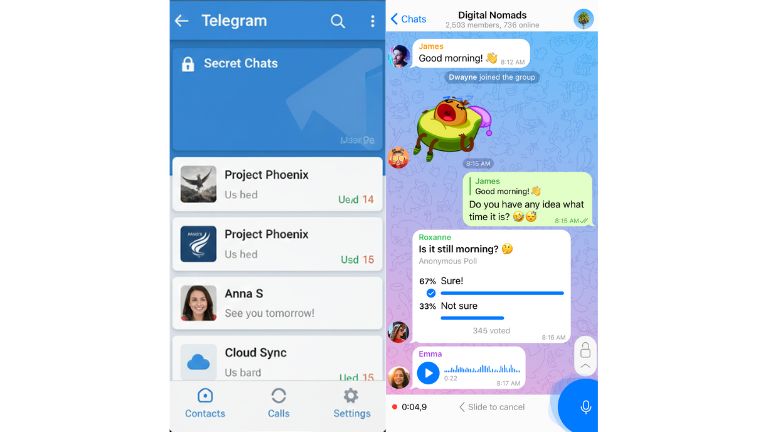
Groups and channels take it up a notch. Groups are like chat rooms where up to 200,000 people can join discussions on topics like hobbies or local events. Channels, meanwhile, are for broadcasting—think newsletters or updates from your favorite creator. Content creators love this; a podcaster might use a channel to share episodes, while a teacher could run a group for class Q&A.
Businesses and educators get a lot out of it too. Companies use Telegram for team communication, sharing files up to 2GB (or 4GB with premium), or even customer support via bots. In education, it’s handy for virtual classes—professors share lectures, students discuss assignments. File sharing is huge; no more email attachments failing because of size limits. For media, you can send high-quality videos or documents without compression issues. Real-world example: During remote work booms, many teams switched to Telegram for its reliability and fun stickers, making collaboration feel less stiff.
Key Features of the Telegram App
Telegram is loaded with features that make it more than a basic messenger. Let’s break down the main ones.
First, Telegram groups and channels are powerhouse tools. Groups allow collaborative chats with admin controls like polls and pinned messages. Channels are one-way broadcasts, ideal for announcements—celebrities or brands often use them to reach fans without replies cluttering things up.
Secret chats are a privacy gem. They offer end-to-end encryption, meaning only you and the recipient can read them—no servers in between. Plus, messages can self-destruct after a set time, like 5 seconds or a week. Perfect for sharing sensitive info, such as a surprise party plan that you don’t want lingering.
End-to-end encryption ties into that—it’s standard in secret chats but not in regular ones, where server-side encryption applies. This balances usability with security.
Large file sharing is a standout: Send files up to 2GB for free, or 4GB with premium. Great for work documents or home videos—no need for external drives.
Bots are automated helpers. From weather updates to games, they’re like mini-apps inside Telegram. A news bot might send daily headlines, saving you app-hopping.
Multi-device support means logging in on phone, PC, and web simultaneously, with everything synced.
Cloud storage keeps your media accessible forever, unless you delete it. No storage worries on your device.
Recent updates in 2025 added cool stuff like collectible gifts (NFT-like items), live stories with chats, repeating scheduled messages, and passkeys for login. For example, send a virtual gift that friends can upgrade or trade—fun for birthdays.
How to Download the Telegram App
Getting Telegram is easy, no matter your device. Here’s how.
For Android: Head to the Google Play Store, search “Telegram,” and tap Install on the official app by Telegram FZ-LLC. It requires Android 5.0 or later. If Play Store isn’t available, download the APK from telegram.org/android. Enable unknown sources in settings, then install. Open the app, enter your phone number, and verify with the code sent.
For iPhone: Open the App Store, search “Telegram Messenger,” and tap Get. It needs iOS 12.0 or later. Sign in with Face ID if prompted. Launch, add your number, and confirm.
For PC/Web: Download desktop versions from telegram.org for Windows, Mac, or Linux. Install and scan the QR code from your phone app. Or use web.telegram.org in your browser—log in via QR or phone code. Tip: Use a desktop for longer sessions, like work chats.
Always download from official sources to avoid fakes.
Is Telegram Safe to Use?
Telegram is generally safe for everyday use, but it’s not perfect. It uses strong encryption for all messages, but end-to-end is only in secret chats—regular ones are server-encrypted. This means Telegram could theoretically access non-secret chats, though they claim not to.
For average users, it’s secure enough with features like 2FA and self-destructing messages. But experts warn it’s not ideal for high-risk folks, like journalists, due to potential metadata exposure or past ties to surveillance concerns.
Be careful with scams—phishing is common, and the app’s lax moderation attracts cybercriminals. Don’t click suspicious links. Overall, for casual chatting, yes, it’s safe; just enable privacy settings.
How Can You Protect Your Personal Information on Telegram?
Protecting your info starts with settings. Go to Settings > Privacy and Security.
Set two-step verification: Add a password beyond SMS code. This stops hackers even if they get your SIM.
Hide your phone number: Set visibility to “Nobody” so strangers can’t see it. Use a username instead for adds.
Control last seen: Limit who sees when you’re online to contacts only.
Avoid scams: Don’t share personal details in groups, verify contacts, and report spam. Use a VPN for extra IP hiding. Tip: Enable passcode lock for the app itself.
How Do I Report Inappropriate Content or Block a User on Telegram?
Spot something off? Reporting is simple.
To block a user: Open their chat, tap their name, then Block User. They can’t message you anymore.
For reporting: In a chat, long-press the message, tap Report, and choose why (spam, abuse, etc.). For groups, report to admins or Telegram via @SpamBot.
Step-by-step: For spam or fakes, use the report button; for illegal content like threats, email abuse@telegram.org with details. This helps keep the platform clean—Telegram acts on valid reports.
Why Is My Telegram Number Banned?
Bans happen for violations like spam, sending mass messages, or using bots improperly. Other reasons: Harassment, illegal content, or multiple reports.
Avoid by not adding strangers to groups without consent, avoiding automation tools, and following guidelines. If banned, appeal via spam_info@telegram.org with your number and explanation. Wait—it might lift in days if first offense.
How Do I Delete My Telegram Account?
Ready to say goodbye? It’s permanent, so back up chats first.
Step 1: Go to my.telegram.org/delete in a browser.
Step 2: Enter your phone number with the code.
Step 3: Get a code in the app, enter it.
Step 4: Click Delete My Account, confirm the reason if asked.
Warnings: All data—messages, groups—gone forever. Contacts won’t see you, but groups you admin might need transfer. Set auto-delete in settings for inactivity (default 6 months). Think twice!
Frequently Asked Questions (FAQs)
Is Telegram free to use?
Yes, Telegram is completely free. No ads in basic chats, though premium offers extras like larger files for a small fee. Core features? Always gratis.
Is Telegram better than WhatsApp?
It depends. Telegram has more features like huge groups and bots, but WhatsApp has default end-to-end encryption for all chats. If you want versatility, go Telegram; for simplicity and security, WhatsApp.
Can Telegram be used without a phone number?
You need a number to sign up, but virtual numbers from services work. After, you can use it on linked devices without the number handy.
Is Telegram legal?
Mostly yes, but banned in countries like China, Iran, and recently Vietnam for security or crime concerns. Check local laws—use VPNs where restricted.
Can deleted Telegram messages be recovered?
Usually no, as they’re gone from servers. But if recent, use Undo within seconds. For deeper recovery, tools like data recovery apps might help on your device, but not guaranteed.
Is Telegram safe for private chats?
For regular chats, somewhat server-encrypted. Use secret chats for true privacy with end-to-end encryption. Avoid sharing sensitive info openly.
Does Telegram store my data?
Yes, on cloud servers for sync, but you control deletions. Premium users get more storage perks.
Can I use Telegram for business?
Absolutely—channels for marketing, bots for automation, groups for teams. Many small businesses use it for customer engagement.