Snapchat has come a long way since its launch in 2011, evolving into a powerhouse for fun, ephemeral sharing and cutting-edge tech. If you’re wondering “what is Snapchat?” or searching for a Snapchat download guide, you’ve landed in the right spot. This comprehensive article dives into everything you need to know about the Snapchat app in 2026, from its core features to safety concerns. Whether you’re a beginner dipping your toes in or an advanced user looking for pro tips, we’ll cover it all with real-world examples and practical advice.
In a world where social media apps like Instagram and TikTok dominate, Snapchat stands out with its focus on authentic, temporary moments. With over 900 million monthly active users and 453 million daily ones, it’s not just for teens—it’s a vibrant platform for creativity, connection, and even business. Let’s break it down step by step.
What Is Snapchat? (Beginner-Friendly Explanation)
At its heart, Snapchat is a multimedia messaging app that lets you send photos, videos, and messages that disappear after being viewed. Founded by Evan Spiegel (who’s still the CEO in 2026), Bobby Murphy, and Reggie Brown, it started as a way to share fleeting moments without the pressure of permanence. Unlike other apps, Snapchat opens directly to your camera, encouraging spontaneous snaps over polished posts.
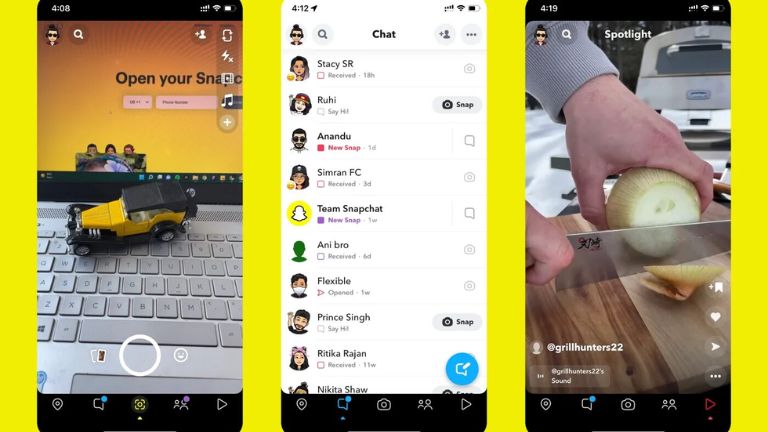
For beginners, think of it as a playful alternative to texting. You can add fun filters, stickers, or text to your snaps before sending them to friends. Stories let you share updates that last 24 hours, and Spotlight is like a TikTok-style feed for short videos. In 2026, Snapchat has leaned heavily into AI and AR, making it more interactive than ever. For example, imagine sending a snap where your friend sees you with virtual glasses or a funny animation— that’s the magic of Snapchat filters.
Why use it? It’s perfect for quick check-ins with friends, like sharing a coffee run or a silly face during a boring meeting. Businesses love it for behind-the-scenes peeks, boosting engagement without the formality of other platforms.
How Snapchat Works
Snapchat’s interface is simple yet intuitive. When you open the app, you’re greeted by the camera screen. Swipe right for chats, left for Discover (curated content), down for Snap Map (to see friends’ locations if shared), and up for Memories (saved snaps).
Sending a snap is easy: Capture a photo or video, edit with tools like lenses or text, and choose recipients. Messages vanish after viewing, but you can save chats or replay snaps once. In 2026, features like Quick Cut use AI to turn your Memories into beat-synced videos, making editing effortless. For instance, if you’re recapping a weekend trip, Quick Cut can compile clips into a shareable montage in seconds.
Advanced users can dive into group chats for up to 100 people or use voice/video calls. The app’s ephemeral nature promotes privacy, but remember: Screenshots can still capture content.
Key Features of the Snapchat App
Snapchat packs a punch with features that keep users hooked. Here’s a breakdown:
- Stories: Share photos or videos that last 24 hours. Great for daily updates, like a “day in the life” series. In 2026, Stories integrate AI personalization, suggesting stickers based on your habits.
- Spotlight: A short-video feed where users submit clips for viral potential. Views exploded over 300% in the US last year, making it ideal for discovering trends or promoting content.
- AR Lenses: Over 250 million users engage with these daily. Try virtual try-ons for clothes or fun animations. Brands use them for interactive ads, like a makeup filter that links to purchases.
- Snap Map: See friends’ locations (with permission). Useful for meetups, but toggle Ghost Mode for privacy.
- Memories: Save snaps privately or share later. With AI tools like Animate It, you can turn static images into videos using open prompts.
- My AI: Snapchat’s chatbot for quick queries or fun chats. It’s powered by partnerships like the $400M deal with Perplexity AI, integrating conversational search in 2026.
These features make Snapchat versatile. For beginners, start with basic snaps; advanced folks can create custom lenses via Lens Studio for monetization.
| Feature | Beginner Use | Advanced Use |
|---|---|---|
| Stories | Daily updates | Branded series with polls |
| Spotlight | Watching clips | Submitting for earnings |
| AR Lenses | Fun filters | Custom AR for events |
Snapchat Filters & Snap Filters Explained
Snapchat filters (or lenses) are what make the app addictive. These AR overlays transform your face or surroundings in real-time. In 2026, new filters doubled downloads back in 2019, and now AI drives even more engagement.
Basic filters add dog ears or rainbows; advanced ones like 3D Bitmoji let you create avatars that interact in videos. Snap filters are user-generated via Lens Studio, with millions available. For example, during holidays, themed filters boost sharing—imagine a New Year’s fireworks lens for your countdown snap.
Benefits? They enhance creativity and fun. Use cases: Teachers use educational lenses for lessons; marketers create branded filters for campaigns, driving 8.8% more conversions per recent ad updates.
Snapchat Pro: What Is It & Is It Worth It?
Snapchat Pro? You mean Snapchat+, the premium subscription launched in 2022. In 2026, it has over 16 million subscribers, offering extras like custom app icons, 250GB storage, ad-free Stories (in Platinum tier), and exclusive lenses.
Pricing starts at $3.99/month, with tiers like Lens+ for AR-focused perks. Is it worth it? For heavy users, yes—features like infinite Memories save space, and AI personalization boosts creativity. For example, subscribers can gift Snapchat+ to friends or use Buddy Pass for shared access.
If you’re a casual user, stick to free; pros love the ad removal and early feature access.
How to Download Snapchat (Android & Other Devices)
Downloading the Snapchat app is straightforward. For Android:
- Open Google Play Store.
- Search “Snapchat download for Android.”
- Tap Install—it’s free!
- Open and sign up with email/phone.
For iOS, use the App Store. In 2026, the app requires Android 15+ or iOS 17+. If issues arise, check storage or restart your device.
Snapchat app download steps ensure quick setup. Once installed, verify your account for full access.
Is Snapchat Safe to Use? Privacy & Security
Safety is a hot topic. Snapchat prioritizes privacy with end-to-end encryption for snaps (but not all content). Default settings for teens are strict: Friends-only contacts, no location sharing.
Family Center lets parents monitor teens’ friends and messages. In 2026, features like expanded warnings and blocking tools combat bullying. For teenagers, it’s safer with restrictions on sensitive content.
Common risks? Scams or data sharing for ads. Tips: Use two-factor authentication, enable Ghost Mode, and review privacy settings. Snapchat collects data for personalization but is transparent post-scrutiny.
Real-world: A parent can request a teen’s location via Family Center, adding peace of mind.
Common Snapchat Problems & Fixes
Bugs happen. Here’s a table of fixes:
| Problem | Fix |
|---|---|
| App crashing | Update app, restart device |
| Loading issues | Check Wi-Fi, clear cache |
| Camera not working | Grant permissions, force stop app |
| Streak lost | Contact support via app |
| Login error (SS06) | Device ban—wait 6-12 months or appeal |
For SS06 bans, it’s due to violations; appeal via the app. If snaps won’t send, switch networks.
Snapchat Tips & Tricks for New Users
New to Snapchat? Start here:
- Customize Bitmoji: Create an avatar for fun personalization.
- Use shortcuts: Double-tap to switch cameras.
- Save snaps: Long-press to add to Memories.
- Group stories: Collaborate with friends.
- Pro trick: Use AR for virtual events, like trying outfits remotely.
For beginners, practice with private snaps. Advanced: Leverage Spotlight for visibility—submit clips with trending audio.
Snapchat vs Other Social Media Apps
Snapchat shines in authenticity vs. Instagram’s polished feeds or TikTok’s algorithms. With 900M MAUs, it’s 9th globally but tops for Gen Z. Vs. Facebook: More private. Vs. TikTok: Ephemeral focus.
Pros: Fun AR, no feed overload. Cons: Less discoverability. In 2026, Snapchat’s AR edge (like upcoming Specs) sets it apart.
Pros and Cons of Snapchat
Pros:
- Ephemeral content reduces pressure.
- Innovative AI/AR features.
- Strong privacy defaults.
Cons:
- Battery drain from camera use.
- Ads in free version.
- Steep learning curve for some.
Future of Snapchat
Looking ahead, Snapchat aims for 1B users by 2026 end. Key: AR Specs launch, AI ad tools, and Perplexity integration for smarter searches. Expect more personalization and AR shopping. Challenges? Competition from Meta’s glasses, but Snapchat’s youth focus could win.
In conclusion, Snapchat remains a fresh, engaging app in 2026. Whether for Snapchat download, filters, or safety, it’s user-friendly with depth for pros. Dive in, experiment, and stay safe—it’s all about those authentic moments.
FAQ
Is ❤ better than 💛 on Snapchat?
No, they’re different stages. 💛 (yellow heart) means you’re #1 Besties currently. ❤️ (red heart) appears after two weeks as #1 BFs—it’s a milestone of consistency!
Is an SS06 Snapchat ban permanent?
Not always—it’s a device ban for violations, often lasting 6-12 months. Appeal via the app if eligible.
Who is the CEO of Snapchat?
Evan Spiegel, co-founder, has led since 2011.
How do I unlock a Snapchat account?
Log in via accounts.snapchat.com and select “Unlock,” or appeal in-app if locked for guidelines violations.
Is Snapchat free to use?
Yes, core features are free. Snapchat+ is optional for premiums.
Can Snapchat be used on PC?
Yes, via Snapchat for Web on Chrome/Edge—chat, call, and snap from your computer.
Is Snapchat safe for teenagers?
With strict defaults, Family Center, and content filters, yes—but monitor and discuss risks like bullying.
How do I recover a lost streak?
Contact Snapchat support in-app; they often restore if it’s a glitch.
What’s new in Snapchat 2026?
AI tools like Quick Cut, Animate It, and AR Specs prep for launch.