The CapCut App has taken the mobile video editing world by storm, especially among Android users looking for quick, professional results. In 2026, with short-form content dominating platforms like TikTok and Instagram Reels, this app stands out as a go-to tool for creators. Whether you’re a beginner dipping into video editing or a seasoned YouTuber, the CapCut App offers intuitive features that make editing fun and efficient. Its popularity surges from the Android video editing trend, where users demand free, powerful apps without steep learning curves. Trusted by over 100 million creators worldwide, it’s backed by solid ratings and real-world use cases that build confidence for new users.
What Is CapCut App
The CapCut App, originally launched in 2020 as a companion to TikTok, has evolved into a standalone powerhouse by 2026. Developed by ByteDance, the same company behind TikTok, it started as a simple editor for viral clips but now handles everything from basic cuts to AI-driven masterpieces. Its brief history shows rapid growth, with updates focusing on user feedback to add features like advanced AI tools.
Common use cases include creating YouTube Shorts, TikTok videos, and Instagram Reels. For instance, influencers use it to polish dance challenges or product reviews, while small businesses edit promotional content on the fly. The app’s seamless integration with social media makes it ideal for quick shares, turning raw footage into engaging stories.
Key Features of CapCut App
The CapCut App shines with its robust toolkit, making it a favorite for Android users.
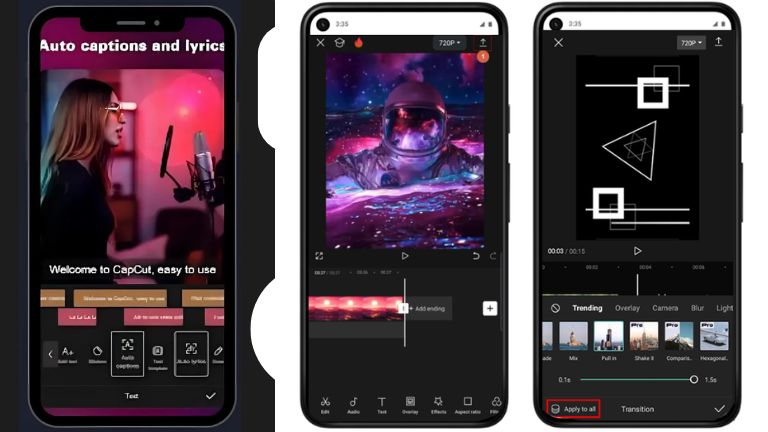
- Video Editing Tools: Trim, cut, speed ramp, and stabilize videos easily. AI features like auto-captions and background removal save time, perfect for beginners.
- Effects & Filters: Access a huge library of CapCut effects, including trending ones like vaporwave or cinematic glows, to make videos pop.
- Templates: Choose from thousands of CapCut templates, from lyric-sync edits to motivational designs, for one-click starts.
- Photo Editor: Built-in CapCut photo editor lets you retouch images, remove backgrounds, or generate AI visuals for mixed-media projects.
- Online Editor: Use the CapCut online editor for browser-based editing, syncing projects across devices without downloads.
- Music & Transitions: Add royalty-free music, sound effects, and smooth transitions like flips or fades to elevate flow.
These features make the CapCut video editing app versatile for casual and pro edits alike.
CapCut App Download and Installation
For Android users, getting the CapCut for Android is straightforward. Head to the Google Play Store for the CapCut app download latest version, which as of early 2026 is 16.9.0. This ensures you get the CapCut latest version with bug fixes and new AI enhancements.
Installation steps: Search “CapCut video editor download” in the Play Store, tap install, and grant permissions for storage and camera. It takes moments on most devices. For alternatives, use trusted sites like CapCut APKMirror or CapCut Uptodown for safe APK files if Play Store access is limited. Always stick to official CapCut sources to avoid risks—scan files and enable unknown sources in settings. Once installed, CapCut install prompts a quick CapCut sign up or CapCut sign in via email or social accounts.
CapCut Pro Version Explained
The CapCut Pro version unlocks premium perks for serious creators. It includes advanced AI tools like 4K exports, premium effects, and ad-free editing, plus unlimited cloud storage.
CapCut Pro price in 2026 starts at around $7.99 monthly or $74.99 yearly, with a 7-day free trial. Compared to free, Pro removes watermarks, adds exclusive templates, and boosts export quality—ideal for high-res videos.
Free vs Pro: The base CapCut free download handles basics well, but Pro shines for pros needing no limits. Beginners might skip it, but if you’re editing daily for TikTok or YouTube, CapCut Pro download is worth it for efficiency gains.
CapCut Templates and Effects
CapCut templates are a game-changer, letting users apply pre-made designs instantly. Best CapCut templates in 2026 include viral ones like “Speed Ramp” for dynamic action clips or “Villain Edit” for dramatic storytelling.
Creators use CapCut template features to sync lyrics with visuals, like aligning beats in Charli XCX trends for hypnotic Reels. Trending CapCut effects in 2026 focus on AI-driven ones, such as body effects for dance videos or motivational overlays with smooth animations.
For example, a fitness influencer might use a “Jj Trend” template to add flair to workout montages, boosting engagement.
CapCut Reviews Pros and Cons
Based on 2026 CapCut reviews, it’s highly rated at 4.7 stars for its ease.
Pros:
- Intuitive interface for fast edits, even on mobile.
- Powerful free AI tools like auto-captions and upscaling.
- Vast library of music, effects, and templates for creative freedom.
- Great value, with no watermarks in free tier.
Cons:
- Occasional lags on large projects or older devices.
- Some premium assets locked behind CapCut Pro subscription.
- Limited offline options for mobile users.
- Privacy concerns due to ByteDance ownership.
Overall, pros dominate for social content creators, but heavy editors might need alternatives.
Is CapCut App Safe and Official
The CapCut official app is safe, available on major stores with no widespread malware reports in 2026. As a ByteDance product, it follows standard privacy policies, collecting data for ads and improvements but using encryption for security.
CapCut support emphasizes user safety, with features like content scanning for abuse. For CapCut sign up and sign in, use strong passwords—it’s secure, but be mindful of data sharing with third parties. Overall, it’s trustworthy for Android, though privacy-conscious users should review settings.
CapCut App Alternatives
If CapCut doesn’t fit, explore other apps. Many creators also use the TikTok App to publish CapCut-edited videos, as it integrates seamlessly for viral shorts.
For media playback, try MX Player App for smooth video viewing post-edit. VLC for Android App handles diverse formats reliably.
Optionally, Snapchat App adds fun filters before importing to CapCut, while Telegram App shares edited files securely.
FAQ
Is CapCut App free in 2026?
Yes, the base CapCut App is free with core features, though Pro adds extras for a fee.
How to download CapCut latest version?
Search CapCut download latest version on Google Play or official sites like APKMirror for Android.
Is CapCut Pro worth it?
Absolutely for frequent editors needing premium effects and 4K; casual users can stick to free.
Can beginners use CapCut?
Definitely—its simple drag-and-drop tools make it beginner-friendly.
Is CapCut safe for Android?
Yes, it’s official and malware-free, but review privacy settings due to data collection.